
Simply Fleet: Fleet Management
Simply FleetAuto & Vehicles
3.912.00 Reviews
- Version
- 111.5
- Installs
- 10.00K
- Age Rating
- Everyone
Screenshots

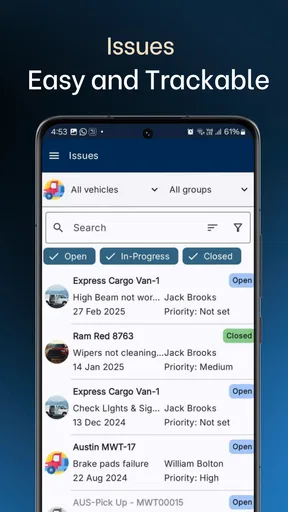
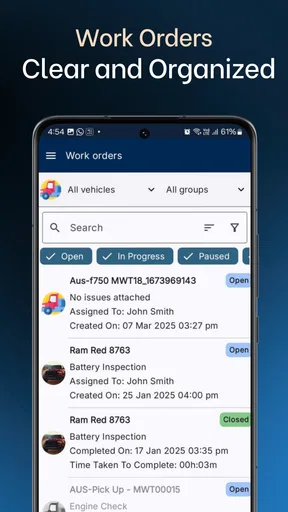
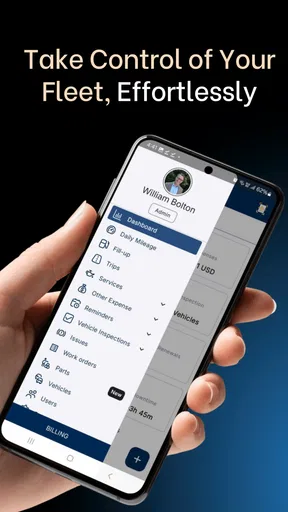
Our Review of Simply Fleet: Fleet Management
 Analysis by Appyee
I find fleet apps most useful when they turn scattered vehicle records into a routine I can actually keep up with. Simply Fleet is aimed at that practical job: it brings maintenance, inspections, fuel, inventory, and other fleet tasks into one place. I would look at it as an operations organizer rather than a substitute for every tool a transport business might use. Its appeal depends on whether your daily headaches come from missed checks and fragmented records, or from needs that call for specialist systems.
Who gets the most from a shared fleet record
The app makes the most sense for a small business, service team, or organization that needs a consistent way to keep track of several vehicles without building a complicated process from scratch. A supervisor can use a central record to prepare for service, while drivers or other staff can contribute information such as inspection results. That shared routine is more valuable than simply having a place to store vehicle details: it helps the next person know what has already been checked and what still needs attention.
For a one-person operation with one vehicle, a calendar reminder and a basic maintenance log may be enough. At the other end, a large fleet with strict reporting needs may require dedicated telematics or accounting tools alongside Simply Fleet. The useful middle ground is a team that wants records to be more orderly but does not want fleet administration to become a project of its own.
A workday where the records matter
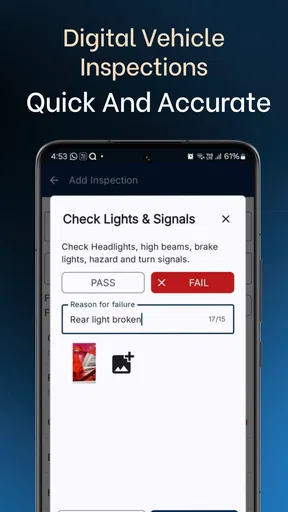
Imagine a team preparing vehicles for a busy morning. A driver notices an issue during a walk-around inspection, and the person coordinating the vehicles needs to know whether it is new, whether the vehicle has had related repairs, and what should happen before it is assigned again. A fleet record that connects inspections with maintenance history can make that handoff clearer than a message lost in a group chat. The important habit is to record the issue promptly and make the follow-up part of the team’s routine; an app cannot act on an inspection nobody enters.
This is also where a useful distinction emerges: digital records help with visibility, but they do not automatically verify a vehicle’s condition or ensure a repair is completed. I would treat Simply Fleet as a way to make responsibilities and history easier to follow, not as a replacement for a qualified inspection or a clear process for taking an unsafe vehicle out of service.
Your Fleet at a Glance
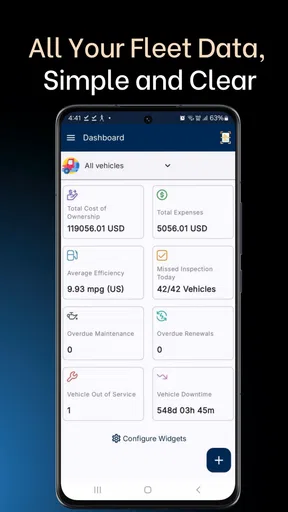
One of the first things I noticed about Simply Fleet is its user-friendly interface. As soon as you fire up the app, you're greeted with a dashboard that gives you a comprehensive overview of your fleet. This is where you get to see all the essential details in one place—from the number of vehicles to their current status and maintenance schedules. Everything is laid out neatly, making it super easy to navigate.
What I particularly loved here is the ability to customize the dashboard according to your preferences. If you want to focus more on vehicle health or fuel consumption, you can tweak the settings to highlight what matters most to you. This level of personalization is a huge plus in my book.
Maintenance Made Easy
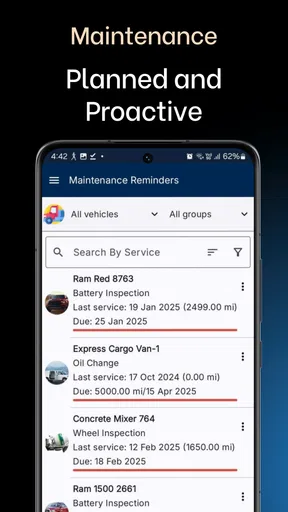
Let's talk maintenance. We all know keeping vehicles in top-notch condition is crucial for any fleet operation. Simply Fleet shines here with its detailed maintenance tracking. The app allows you to set up reminders for regular check-ups and services. No more digging through spreadsheets or sticky notes plastered all over your desk. The app keeps you informed about upcoming maintenance tasks, so you can stay ahead of any potential issues.
Another feature worth mentioning is the maintenance history log. This function lets you track all past services and repairs, complete with dates and costs. It's like having a digital paper trail, making it easier to spot recurring problems or plan for future expenses.
Making maintenance records useful
A history log becomes more helpful when entries are made in a consistent way. I would agree on a simple team convention for naming work, recording costs, and noting which vehicle received the service. Otherwise, two people may describe the same repair differently, making later comparisons harder. This is a small setup decision, but it can determine whether records become useful evidence for planning or just another archive to search.
Reminders also work best when someone owns the follow-up. A notification can prompt a booking, but it cannot confirm that a workshop visit took place or that an invoice was checked. For a busy team, I would pair reminders with a quick weekly review of upcoming tasks and unresolved inspection notes. That keeps the app from becoming a passive list of alerts that everyone assumes someone else has handled.
Tracking Fuel Consumption
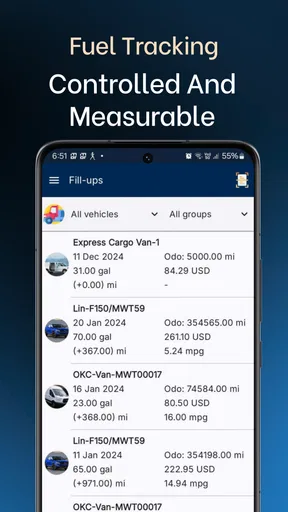
Fuel costs can eat into your budget faster than you'd expect, and Simply Fleet tackles this with its fuel tracking feature. You can log fuel purchases, track consumption, and even calculate cost per mile. This not only helps in budgeting but also in identifying any fuel efficiency issues with your vehicles. If you notice a sudden spike in fuel usage, it might be time to investigate further.
The app also provides insightful charts and reports that make analyzing fuel consumption a breeze. This is incredibly useful for making data-driven decisions to optimize your fleet's performance.
Reading fuel entries with care
Fuel figures are only as dependable as the entries behind them. If drivers record purchases at different times or omit mileage, a chart may look precise without offering a fair comparison. I would make the entry routine easy to remember—capture the purchase and relevant vehicle information at the same point each time—then review unusual changes as prompts to ask questions, not proof of misuse or a mechanical fault.
That cautious approach is especially useful when vehicles have different routes, loads, or work patterns. A jump in consumption can reflect a genuine maintenance issue, but it can also reflect a change in how the vehicle is being used. The app can help surface a pattern; a manager still needs context before deciding what it means.
Inspections and inventory in the wider workflow
Vehicle inspections and inventory are part of Simply Fleet’s scope, which can help a team keep operational checks closer to its maintenance records. A practical use is to make inspections a handoff step: the person using a vehicle records its condition, and the person assigning work checks whether anything needs attention. Inventory tracking can support the same kind of discipline for items a fleet team needs to monitor, but it is worth deciding what belongs in that record before staff begin entering information.
I would avoid treating one broad app as a reason to track every detail imaginable. Start with the records that answer real questions—what needs service, what was checked, and what supplies need attention—then expand only if the team keeps those entries current. This reduces clutter and gives new users a shorter path to learning the workflow.
Driver Management
Managing drivers can often be just as challenging as managing the vehicles themselves. Simply Fleet steps up to the plate with its comprehensive driver management system. You can keep track of driver details, licenses, and certifications all in one place. This not only ensures compliance with regulations but also helps in scheduling and dispatching.
There's even a feature for monitoring driver behavior. By analyzing driving patterns, you can promote safer driving habits across your fleet. It's all about keeping both your drivers and vehicles safe on the road.
Choosing it over familiar alternatives
Compared with a spreadsheet, Simply Fleet offers a more purpose-built way to keep vehicle-related work together, especially when several people need to contribute. A spreadsheet can be cheaper in effort for a tiny operation, but it relies heavily on careful editing and someone remembering to maintain it. Compared with a collection of separate maintenance, fuel, and inspection notes, a central app can make the connections easier to see. A specialist fleet platform may still be the better fit if dispatch, live vehicle tracking, or deep integrations are the main priority; I would not assume this app replaces those systems.
There is also a people factor. A shared tool only improves coordination if drivers and managers find its routine manageable. Before moving all records over, I would test a short workflow with the people who will actually enter and review information. If the steps feel cumbersome, adoption will be the real limitation, no matter how tidy the dashboard looks.
Current version and the decision to try it
Simply Fleet is developed by Simply Fleet and sits in the auto and vehicle tools category. It is free to install, rated for Everyone, and has an average rating of 3.9 from 294 ratings, with 10K+ installs. The current version is 111.1, and it runs on Android 6.0 or later. In-app purchases range from $9.99 to $329.99 per item, so I would check the available options in the app and make sure they suit the way your team plans to use it before relying on a paid capability.
The app was released on June 18, 2020, and its current version gives prospective users a concrete point of reference for what they would install now. That version number alone does not tell me which workflows have changed or how those changes affect a particular team, so I would judge it by testing the current maintenance, inspection, and record-keeping routines you actually need. Existing users should likewise review their own process after an app change rather than assume every team’s workflow will be affected in the same way.
What to check before building a routine around it
Before committing, I would test a few practical questions: can the people responsible for inspections enter information consistently, can a manager find an unresolved issue quickly, and does the maintenance history answer the questions that matter when planning service? I would also decide who reviews records and how often. Those checks reveal more about day-to-day fit than a feature checklist, because the value comes from information being current and shared.
For a team already using another system, the key question is whether Simply Fleet should become the main record or a focused companion for vehicle tasks. Keeping two systems without assigning one as authoritative can create conflicting versions of the truth. If you need a single, highly customized reporting environment, compare that need carefully with the app’s straightforward fleet-management focus before moving records.
The Verdict
After spending some quality time with Simply Fleet, I can confidently say that it's a robust tool for anyone looking to streamline their fleet operations. The app offers a rich feature set that covers everything from vehicle maintenance to driver management. The intuitive design makes it accessible even for those who aren't tech-savvy.
If you're in the market for a fleet management app that combines functionality with ease of use, Simply Fleet is definitely worth a shot. Whether you're overseeing a small fleet or managing a large operation, this app has the tools to help you keep everything running smoothly.
Remember, in the world of fleet management, staying organized is key. And with Simply Fleet, you're not just managing vehicles—you're enhancing efficiency and saving time. Give it a try, and see how it transforms your fleet management experience.
My recommendation
I would start with a limited trial in the everyday sense: choose a handful of vehicles, agree on how staff record inspections and fuel, and see whether the maintenance reminders lead to timely action. That gives you a realistic read on staff adoption and the quality of the resulting records before the app becomes central to operations. If the team wants a simple place to organize these recurring responsibilities, Simply Fleet is a sensible option to explore. If your priority is advanced dispatch or automated tracking, I would compare specialist alternatives first.
Verdict
Strengths of Simply Fleet: Fleet Management
- User-friendly interface, easy navigation.
- Comprehensive vehicle tracking features.
- Real-time alerts enhance safety.
- Cost-effective for small businesses.
- Supports multiple vehicle types.
Limitations of Simply Fleet: Fleet Management
- Limited offline functionality.
- Requires stable internet connection.
- Initial setup can be time-consuming.
- Advanced features may need premium.
- Customer support response can be slow.
Similar Picks in This Category
View All
Android Auto
Google LLC4.1

maxim — order a taxi & food
PT. SITO4.7

Штрафы ГИБДД: проверка с фото
Pays LLC – Штрафы ГИБДД4.7

Номерограм – проверка авто
Авто Ассист4.8

Дром Авто
Дром4.9

Frequently Asked Questions
What features does Simply Fleet offer for managing vehicles?
Simply Fleet provides a comprehensive suite of features including vehicle tracking, maintenance scheduling, fuel management, and driver management. Users can monitor vehicle health, track fuel expenses, and plan service schedules, ensuring optimal fleet performance and cost efficiency. The app also supports real-time alerts and detailed reporting to keep fleet managers informed.
Is Simply Fleet suitable for small businesses?
Yes, Simply Fleet is designed to cater to businesses of all sizes, including small and medium enterprises. Its scalable features allow small businesses to manage their fleet efficiently without overwhelming complexity. The intuitive interface ensures ease of use, and the cost-effective pricing model makes it accessible for businesses with limited budgets.
Can Simply Fleet be used for tracking driver performance?
Simply Fleet includes driver management tools that allow fleet managers to track and evaluate driver performance. The app records driving behavior, such as speed, routes taken, and adherence to schedules. This data helps in assessing driver efficiency and safety, enabling managers to provide feedback and implement necessary improvements.
Does Simply Fleet support integration with other systems?
Yes, Simply Fleet supports integration with various third-party systems and software. This includes accounting programs, GPS devices, and other fleet management tools. Such integrations facilitate seamless data transfer and improve operational efficiency by creating a cohesive ecosystem for managing all fleet-related activities.
What platforms is Simply Fleet available on?
Simply Fleet is available on both Android and iOS platforms, making it accessible to a wide range of users. The app can be downloaded from Google Play Store and Apple App Store, ensuring that fleet managers can access and manage their fleet data from anywhere using their preferred mobile devices.
